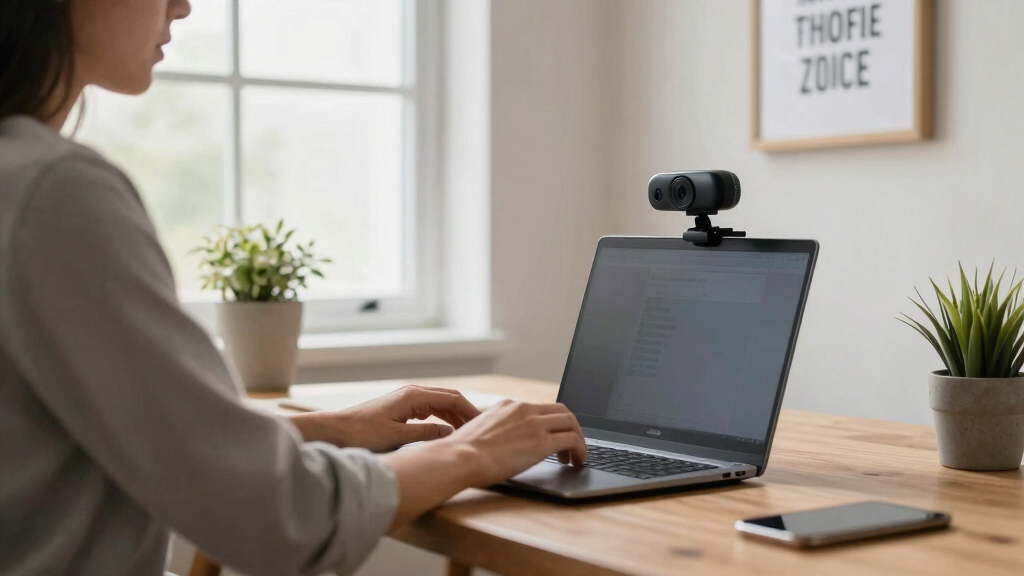
Choosing the best video conferencing webcam for a home office involves balancing image quality, usability, and price. The Logitech Brio 4K stands out as the overall top pick thanks to its high resolution and excellent light correction, ideal for professional meetings. If you seek affordability, the NexiGo N60 offers solid 1080p quality with easy plug-and-play setup. For those prioritizing simplicity and built-in features, the Logitech C920x delivers reliable HD video at a more accessible price. Tradeoffs include balancing higher image quality against cost and ease of use, making it essential to consider your specific needs. Continue reading for a detailed breakdown of each option to find the best fit for your home office setup.
Key Takeaways
- Higher resolution webcams like the Logitech Brio 4K deliver sharper images but come at a higher price and require better lighting conditions.
- Plug-and-play models such as NexiGo N60 and EMEET C960 are ideal for quick setups but may lack advanced features like auto-focus or AI noise cancellation.
- Built-in microphones vary greatly; models with AI noise cancellation provide clearer audio in noisy environments, crucial for professional calls.
- Field of view impacts how much of your background or room is visible; wider FOVs are better for group calls or showing more space, while narrower FOVs focus on you.
- Price often correlates with features—spending more generally yields better video quality, but budget options can still provide decent performance for everyday use.






More Details on Our Top Picks
j5create 360 Degree All Around Meeting Webcam – 1080P HD Video Conference Camera with High Fidelity Microphone, USB-C | for Video Conferencing, Online Classes, and Collaboration (JVCU360)
This webcam excels in delivering a comprehensive 360-degree view, making it ideal for informal meetings or collaborative sessions where multiple participants are spread around a table. Unlike the Logitech Brio, which focuses on high-res video for individual use, the J5create offers six display modes and a panoramic perspective, though it lacks auto-zoom or speaker tracking features. Its built-in omnidirectional microphone covers a wide area, but noise canceling can mute some voices if you’re outside the optimal range. The touch bar for participant location is intuitive, but the camera doesn’t automatically locate active speakers or adjust framing, requiring manual input. This makes it less suited for formal presentations but perfect for hybrid team huddles or small classrooms where flexibility outweighs high fidelity. Overall, it’s a solid choice for users needing wide-angle coverage without the expense of premium auto-tracking models.
Pros:- 360° panoramic view for versatile coverage
- Multiple display modes for different scenarios
- Plug-and-play with USB-C compatibility
Cons:- Lacks auto-zoom or speaker tracking features
- No built-in speaker, requiring external audio
- Limited to basic firmware without advanced AI features
Best for: Small teams or educators requiring a broad, flexible view for collaborative environments.
Not ideal for: Professional presenters or those needing auto-framing and speaker tracking for formal meetings.
- Video Resolution:Full HD 1080p
- Display Modes:Six modes including 360° view
- Microphone:High fidelity omnidirectional
- Connectivity:USB-C
- Field of View:360 degrees
- Compatibility:Windows, macOS, Chrome OS, Linux
Bottom line: This webcam is ideal for casual, versatile use where wide-angle coverage is more important than high-end auto-framing.
Logitech Brio 4K Webcam, Video Calling, Noise-Cancelling mic, HD Auto Light Correction, Wide Field of View, Windows Hello Works with Microsoft Teams, Zoom, Google Meet, PC/Mac/Laptop/MacBook/Tablet
Compared to the NexiGo N60, the Logitech Brio offers stunning 4K resolution, making it the top pick for professionals needing crisp, detailed video for remote consultations or presentations. Its automatic light correction (RightLight 3) ensures consistent image quality in any environment, a feature that outperforms most 1080p webcams like the NexiGo. The wide field of view options and Windows Hello facial recognition add versatility and security, respectively. However, its premium price and slightly larger size may be a drawback for those seeking a more portable or budget-friendly option. The built-in noise-canceling microphone provides clear audio, but in noisy environments, an external mic might still be preferable. Overall, the Brio stands out for high-quality visuals and adaptive features, making it ideal for professional use from a home office.
Pros:- Supports 4K Ultra HD resolution
- Automatic HD light correction for consistent quality
- Windows Hello facial recognition for quick login
Cons:- Higher cost compared to 1080p webcams
- Bulkier design less portable
- Power consumption can be higher in prolonged use
Best for: Remote professionals or content creators needing high-res video with automatic lighting adjustments.
Not ideal for: Budget-conscious users or those prioritizing portability over resolution quality.
- Video Resolution:4K UHD at 30 fps
- Field of View:65°, 78°, 90° presets
- Microphone:Dual noise-canceling mics
- Light Correction:HD Auto Light Correction
- Compatibility:Windows, Mac, ChromeOS
- Special Features:Windows Hello support
Bottom line: This webcam is perfect for professionals who need exceptional video quality and adaptive lighting in a home office setting.
NexiGo N60 1080P Webcam with Microphone, Software Control & Privacy Cover, USB HD Computer Web Camera, Plug and Play, for Zoom/Skype/Teams, Conferencing and Video Calling
The NexiGo N60 provides a reliable 1080p video experience similar to the Logitech C920x but at a more accessible price point, making it suitable for casual remote workers or small teams. Its built-in noise-canceling microphone enhances audio clarity, although it doesn’t match the premium quality of higher-end models like the Brio. The included privacy cover adds security, which is a significant plus for home use, especially if you share your space with others. While it doesn’t offer advanced auto-light correction, it performs well in controlled lighting environments. The plug-and-play setup ensures quick deployment, but it lacks the auto-focus and wide-angle flexibility of more expensive options. Overall, the NexiGo strikes a balance between affordability and decent video quality, making it a good choice for everyday video calls.
Pros:- Full HD 1080p video quality
- Built-in noise-canceling microphone
- Privacy cover included
Cons:- No auto-focus or wide-angle options
- Limited light correction features
- Basic firmware without AI enhancements
Best for: Home users or small teams seeking reliable 1080p video with privacy features without high cost.
Not ideal for: Professional content creators or those requiring 4K resolution and advanced auto-focus.
- Video Resolution:1080p FHD
- Microphone:Built-in noise-canceling
- Privacy Cover:Yes
- Connectivity:USB 2.0/3.0
- Compatibility:Windows, Mac, Linux, ChromeOS
- Field of View:Fixed
Bottom line: This webcam offers dependable 1080p video for budget-conscious users who prioritize privacy and ease of use.
Logitech BCC950 Desktop Conferencing Solution, Full HD 1080p B23 Calling, Hi-Definition Webcam, Speakerphone with Noise-Reducing Mic, for Skype, WebEx, Zoom PC/Mac/Laptop/MacBook – Black
The Logitech BCC950 combines a high-quality 1080p webcam with an integrated speakerphone, making it an all-in-one solution ideal for small to medium-sized remote meetings. Compared to standalone webcams like the NexiGo, it offers superior audio with noise reduction and echo cancellation, suitable for professional settings where clear communication is vital. Its remote-controlled pan, tilt, and zoom features allow for flexible framing, although it’s bulkier and less portable than compact models like the NUROUM C10. This system is perfect for users who want a plug-and-play conference setup without additional equipment. However, it’s less suited for users needing high-resolution video for content creation or streaming. Overall, it’s an excellent choice for small team meetings and remote collaboration with integrated audio.
Pros:- Full HD 1080p video with PTZ control
- Built-in noise-reducing microphone and speakerphone
- Easy plug-and-play setup
Cons:- Bulky and less portable
- Limited to 1080p resolution
- Higher cost compared to simple webcams
Best for: Small business teams or remote workers needing an all-in-one video and audio conferencing device.
Not ideal for: Content creators or users seeking ultra-high resolution video quality.
- Video Resolution:1080p HD
- Microphone:Noise-reducing, full duplex
- Zoom/Pan/Tilt:Yes, remote-controlled
- Built-in Speaker:Yes
- Compatibility:PC, Mac, Windows, MacOS
- Use Case:Small to medium conference rooms
Bottom line: This all-in-one conferencing system is ideal for small teams needing integrated audio and video in a compact setup.
NUROUM C10(2nd Gen) 1080P Conference Webcam with Microphone Speaker, Portable All in One Computer Camera for Video Conference, AI Noise Cancellation & AGC, USB Plug&Play for PC/Desktop Zoom/Teams
The NUROUM C10 combines a 1080p camera, microphone array, and speaker into a single portable device, making it perfect for small meeting rooms or remote workers who need a flexible, easy-to-deploy solution. Its industry-leading AI noise cancellation and automatic gain control (AGC) ensure clear audio even at distances up to 10 feet, outperforming basic microphones like the NexiGo in noisy environments. The 90° wide-angle lens captures sufficient room details, ideal for small teams or individual remote work. Its plug-and-play USB-C connection makes setup straightforward, but it’s limited in advanced features like auto-focus or auto-tracking. While not suited for high-end streaming, it offers excellent value for small meetings and hybrid work scenarios where portability and ease of use matter most.
Pros:- Integrated 1080p camera, mic, and speaker
- AI noise cancellation & AGC for clear audio
- Portable, lightweight design
Cons:- Fixed focus lens
- Limited auto-framing features
- Basic firmware with no advanced AI tracking
Best for: Small teams or remote workers needing a portable, all-in-one video and audio device.
Not ideal for: Professional streamers or those requiring advanced auto-focus and wide-angle options.
- Video Resolution:1080p
- Field of View:90°
- Microphone:4-element noise-canceling
- Speaker:Built-in high-fidelity
- Connectivity:USB-C
- Features:AI noise cancellation, AGC
Bottom line: This webcam is ideal for small, mobile meetings where all-in-one simplicity and audio clarity are priorities.
Logitech C920x HD Pro PC Webcam, Full HD 1080p/30fps Video, Clear Audio, HD Light Correction, Works with Microsoft Teams, Google Meet, Zoom, Nintendo Switch 2’s new GameChat Mode, Mac/Tablet- Black
The Logitech C920x stands out for offering reliable, crisp 1080p video with automatic light correction and autofocus, making it ideal for professional-looking calls. Its dual microphones capture clear audio, rivaling the Logitech C920S but with added software options like XSplit VCam for background blurring. Compared to other options, it balances affordability with high-quality features, though it lacks a privacy shutter—something the Logitech C920S provides. This webcam is perfect for users who want dependable performance across multiple platforms without fuss. However, it may fall short for those needing built-in privacy controls or 4K resolution. Best for remote workers and content creators who prioritize quality and versatility.
Pros:- Sharp Full HD 1080p video with autofocus and light correction
- Dual stereo microphones for clear audio
- Compatible with multiple conferencing platforms
Cons:- No built-in privacy shutter
- Lacks 4K resolution for ultra-clear video
- No physical privacy cover included
Best for: Remote workers and content creators needing crisp video and flexible software features.
Not ideal for: Users prioritizing privacy with a physical shutter or requiring 4K resolution for ultra-high detail.
- Video Resolution:1080p/30fps
- Audio:Stereo dual mics
- Light Correction:Yes
- Autofocus:Yes
- Compatibility:Windows, Mac
- Privacy Shutter:No
Bottom line: This webcam suits professionals seeking reliable, high-quality video with good audio for everyday home office needs.
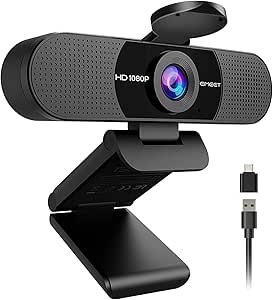
EMEET 1080P Webcam with Microphone, C960 Web Camera, 2 Mics Streaming Webcam, 90°FOV Computer Camera, Plug and Play USB Web Cam for Online Calling/Conferencing, Zoom/Teams/Facetime/YouTube, Laptop/PC
The EMEET C960 delivers solid 1080p video with a wide 90° field of view, offering great value for those needing broad coverage during calls. Its built-in two microphones with noise reduction improve voice clarity, comparable to the Logitech C920x, but at a lower price point. The automatic low-light correction and simple plug-and-play setup make it accessible for beginners, although it doesn’t support advanced features like background removal. Compared with higher-end webcams, it sacrifices some image detail and stability in dim conditions, but remains reliable for everyday use. This pick makes sense for users who want decent quality without extra bells and whistles. However, those seeking professional studio-level clarity or privacy shutters should look elsewhere. Ideal for casual remote work, online classes, or streaming on a budget.
Pros:- Full HD 1080p video with 90° wide view
- Dual omnidirectional noise reduction microphones
- Plug-and-play with no driver installation
Cons:- Limited low-light performance compared to premium webcams
- No privacy shutter included
- Fixed focus may reduce sharpness at close distances
Best for: Students and casual professionals seeking affordable, broad-angle HD video.
Not ideal for: Power users needing advanced features like background blurring or 4K resolution.
- Video Resolution:1080p
- Field of View:90°
- Microphones:2 omnidirectional
- Focus:Fixed
- Compatibility:Windows, Mac, Linux
- Light Correction:Yes
Bottom line: This webcam offers excellent value for users who want broad coverage and decent audio without complex setup or high costs.
EMEET C960 1080P Webcam with Microphone, 2 Mics, 90° FOV, USB Type-A & A-to-C Adapter, Fixed Focus, Plug&Play Computer Camera for Zoom/Teams/Facetime/YouTube/Google Meet/Switch 2 Camera, 2025 Version
The EMEET C960 2025 emphasizes adaptability with USB Type-A and Type-C connections, making it suitable for various devices. Its 1080p resolution paired with automatic exposure and color adjustment ensures consistent image quality, similar to the Logitech C920x, but with enhanced connectivity options. The 90° wide-angle lens offers ample coverage, and its plug-and-play design simplifies setup. While it shares features like noise-reducing microphones with the EMEET C960, the upgraded version provides better compatibility with newer systems and the convenience of multiple USB adapters. Its fixed focus and decent low-light performance make it a solid choice for home offices that switch between devices or require portable solutions. However, it lacks a privacy shutter—something the Logitech C920S offers. Ideal for users needing versatile connectivity and easy portability.
Pros:- Full HD 1080p with automatic exposure and color correction
- Dual omnidirectional microphones
- Supports both USB Type-A and Type-C with adapters
Cons:- No physical privacy shutter
- Fixed focus may impact close-up clarity
- Limited low-light enhancement compared to premium webcams
Best for: Home office workers and students who use multiple devices and need straightforward setup.
Not ideal for: Users requiring advanced privacy features or high-end low-light performance.
- Video Resolution:1080p
- View Angle:90°
- Microphones:2 omnidirectional
- Focus:Fixed
- Connectivity:USB Type-A & C adapters
- Light Adjustment:Auto
Bottom line: This webcam is well-suited for flexible device use and portability in a home office environment.
Logitech C920S HD Pro Webcam, Full HD 1080p/30fps Video Calling, Clear Stereo Audio, Light Correction, Privacy Shutter, Works with Skype, Zoom, FaceTime, Hangouts, PC/Mac/Laptop/Tablet/Xbox
The Logitech C920S enhances security with an integrated privacy shutter and offers crisp 1080p video with light correction, making it a favorite for sensitive or distraction-prone environments. Its full HD video and stereo microphones ensure professional-quality calls, comparable to the Logitech C920x, but with added privacy controls. The adjustable clip fits a variety of devices, and compatibility spans most major platforms, simplifying setup. Compared to webcams without privacy shutters, this model provides peace of mind, especially when switching between work and personal use. However, it doesn’t include extra software features like background blur. If privacy is a priority, this webcam is a reliable choice, though it might be less feature-rich for content creators looking for more customization. Best suited for users who need a secure, straightforward webcam for confidential calls.
Pros:- Full HD 1080p video with light correction
- Built-in privacy shutter for security
- Compatible with most platforms
Cons:- Lacks background removal features
- No 4K or ultra-wide options
- No software for advanced effects
Best for: Professionals handling sensitive information or in privacy-conscious home offices.
Not ideal for: Content creators or streamers seeking advanced background effects or 4K resolution.
- Video Resolution:1080p/30fps
- Privacy:Shutter
- Audio:Stereo
- Light Correction:Yes
- Compatibility:Windows, Mac, Xbox, Tablet
- Field of View:78°
Bottom line: This webcam is ideal for users needing a secure, high-quality video feed with easy privacy controls.
Logitech Brio 101 Full HD 1080p Webcam for Meetings, Streaming, Desktop, Laptop, PC – Built-in Mic, Shutter, Works with Zoom, Microsoft Teams, Nintendo Switch 2’s new GameChat Mode, USB-A,-Black
The Logitech Brio 101 is designed for users who want premium streaming quality with a sleek, modern look. It offers 1080p resolution with auto-light balance and a built-in privacy shutter, aligning well with the Logitech C920s but with a focus on ease of use and aesthetic appeal. Its USB-A connection ensures reliable plug-and-play, and the adjustable zoom and framing options can be tailored via Logitech’s software, making it suitable for gaming, streaming, or professional calls. While it shares many features with higher-end models, it doesn’t match the 4K clarity or ultra-wide fields of the Logitech Brio 4K. It’s best for users who want a stylish, high-quality webcam that integrates seamlessly into a home setup. However, it might be overkill for basic video calls or those on a strict budget. Ideal for streamers, content creators, and gaming enthusiasts who demand quality and style.
Pros:- 1080p resolution with auto light balance
- Privacy shutter and adjustable zoom
- Sleek, modern design
Cons:- No 4K or ultra-wide field of view
- Requires Logitech software for full customization
- Higher price compared to basic webcams
Best for: Streamers and gamers seeking high-quality visuals with privacy features.
Not ideal for: Basic users or those needing only standard HD video without extra software adjustments.
- Video Resolution:1080p
- Privacy:Shutter
- Auto Light Balance:Yes
- Field of View:78°
- Connection:USB-A
- Focus:Auto
Bottom line: This webcam is best for users who want stylish, high-quality video with easy privacy controls for streaming or professional work.
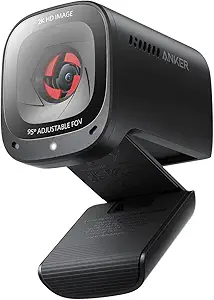
Anker PowerConf C200 2K Webcam for PC/Laptop/Mac, Computer Camera, Low-Light Correction, AI-Noise Canceling Mics, Adjustable Field of View, Built-in Privacy Cover, Stereo Mics, for Meeting
This webcam stands out for delivering a sharp 2K resolution that surpasses many 1080p options like the NexiGo N60, providing detailed video that elevates professional calls. Its superior low-light performance ensures clear images even in dim environments, a feature where some competitors like the Logitech C920x fall short. The dual AI noise-canceling microphones make voice clarity a highlight, ideal for noisy home setups, though this can drain system resources compared to simpler mics. The adjustable field of view offers flexibility to frame your shot perfectly, which is more versatile than fixed-angle webcams. The built-in privacy cover adds a layer of security, but it’s less sleek than the sliding covers on higher-end models like the Logitech Brio. Overall, this pick makes the most sense for users who want a blend of excellent video and audio quality without overspending, but it might be too bulky for very tight spaces.
Pros:- Incredible 2K resolution for sharp, detailed video quality
- Excellent low-light correction for late-night or dim rooms
- Versatile adjustable field of view for optimal framing
- Built-in privacy cover for security between calls
Cons:- Bulkier design may be less suitable for tight spaces
- Higher price point compared to standard 1080p webcams
- Somewhat complex setup for non-tech-savvy users
Best for: Home office professionals who need clear video and audio in varied lighting conditions.
Not ideal for: Users seeking a compact, minimalistic webcam, as its size is somewhat larger than typical models.
- Resolution:2K Ultra-Clear
- Audio:AI Noise Canceling Dual Mics
- Field of View:65°, 78°, 95° (software adjustable)
- Low-Light Performance:Superior
- Connectivity:USB-C
- Compatibility:Windows 7+, macOS 10.11+
Bottom line: This webcam is ideal for professionals who prioritize image clarity and sound quality in a home office setting.
How We Picked
I evaluated these webcams based on several key criteria: video quality, ease of use, build quality, microphone performance, compatibility with common conferencing platforms, and value for money. Higher resolution and advanced features like AI noise cancellation or adjustable FOV were prioritized for professional environments. Simplicity and quick setup were important for users new to video conferencing, while durability and software options influenced higher-end picks. I ranked these options by balancing performance with affordability, ensuring each product offers a distinct advantage tailored to different user needs. This approach helps identify the best overall, best value, and specialized options for various home office scenarios.Factors to Consider When Choosing Best Video Conferencing Webcam For Home Office
When choosing the best video conferencing webcam for your home office, it’s essential to consider factors beyond just resolution. The right webcam should match your specific work environment, lighting, and collaboration needs. Understanding these factors can prevent common pitfalls like underestimating lighting requirements or overpaying for unnecessary features. The following sections highlight the main considerations to make an informed purchase that enhances your video calling experience.Video Resolution and Frame Rate
Higher resolutions like 4K provide crisper images, which are valuable for professional presentations or large displays. However, 1080p remains sufficient for most video calls and consumes less bandwidth, reducing lag or buffering issues. Frame rate also matters; 30fps is standard, but higher rates can improve motion smoothness during fast movements. Consider your internet connection and hardware capabilities to select a resolution that balances quality and performance without causing delays.
Field of View (FOV) and Framing
The FOV determines how much of your background and surroundings are visible on camera. A wider FOV (e.g., 90° or more) works well for group meetings or if you want to display more space around you. Narrower FOVs focus tightly on your face, which can be more flattering and less distracting. Think about your typical meeting setup and choose accordingly to avoid awkward framing or missing important background details.
Lighting and Auto-Adjustment Features
Good lighting can dramatically improve video quality. Webcams with automatic light correction or low-light enhancement can compensate for less-than-ideal lighting conditions, making you look clearer and more professional. If your home office has uneven lighting or is poorly lit, prioritize models with these features to avoid appearing dark or washed out during calls. Avoid webcams that require extensive manual adjustments if your environment varies frequently.
Microphone Quality and Noise Cancellation
Clear audio is just as important as video quality. Built-in microphones with noise-canceling technology can significantly reduce background noise, ensuring your voice comes through crisp and understandable. For busy households or noisy environments, investing in a webcam with AI noise cancellation adds a layer of clarity that makes conversations smoother. Remember, poor microphone quality can undermine your professional appearance regardless of how good your video looks.
Compatibility and Ease of Use
Most webcams are compatible with major platforms like Zoom, Teams, and Google Meet, but it’s worth verifying. USB connectivity is standard, but some models support USB-C or offer adapters for versatile setups. User-friendly software and straightforward installation matter, especially for less tech-savvy users. Consider whether you prefer plug-and-play options or features like adjustable settings and firmware updates to enhance your experience over time.
Frequently Asked Questions
Do I need a 4K webcam for home office use?
While 4K webcams like the Logitech Brio offer the highest image resolution, they are not essential for most home office tasks. 1080p webcams provide sharp, clear video quality suitable for professional meetings, and they typically perform better under varying lighting conditions. Investing in 4K makes sense if you require ultra-high detail for presentations or content creation, but for everyday conferencing, 1080p remains a practical and cost-effective choice.
How important is the field of view for my webcam?
The FOV impacts how much of your surroundings are visible on camera. If you often attend group meetings or want to show more of your workspace, a wider FOV (around 90° or more) is beneficial. For solo video calls where only your upper body needs to be seen, a narrower FOV (around 78° or less) keeps the focus on your face. Selecting the right FOV helps avoid awkward cropping or excessive background, improving overall video presentation.
Should I prioritize built-in microphones or buy an external mic?
Many webcams now feature decent microphones, but for clearer audio, especially in noisy environments, an external microphone can make a noticeable difference. If your webcam has AI noise cancellation, it might suffice for typical calls. However, for frequent meetings, presentations, or content creation, investing in a dedicated microphone ensures higher audio quality and more consistent sound, which can enhance your professional appearance.
Is auto-focus necessary on a webcam?
Auto-focus helps keep your image sharp as you move or if you change distance from the camera. For most home office setups where you remain mostly stationary, fixed-focus webcams like the EMEET C960 perform well and are more affordable. If you often shift positions or share a workspace with multiple people, a webcam with reliable auto-focus will maintain clarity without manual adjustments, making your calls less distracting.
How much should I spend on a good webcam for home office?
Webcams range from budget-friendly options around $50 to premium models over $200. For casual or infrequent use, a mid-range 1080p webcam offers good value. If your work depends heavily on video quality—such as content creation or frequent professional presentations—spending more on higher resolution, better microphones, and features like AI noise cancellation can provide a noticeable boost. Balance your budget with the features that most impact your daily workflow.
Conclusion
For most home office users, the Logitech Brio 4K stands out as the best overall choice due to its high resolution and advanced features, suitable for professionals who need sharp images and reliable performance. Those on a budget or looking for simplicity will find the NexiGo N60 to be an excellent value, providing solid 1080p quality with minimal fuss. Beginners or less tech-savvy users should consider models like the Logitech C920s for plug-and-play ease. Finally, if your work involves frequent content creation or streaming, investing in a higher-end option like the Anker PowerConf C200 provides the extra image clarity and microphone quality needed for polished results. Assess your specific needs and budget to select the perfect webcam for your home office.